InstaDoodle Features at a Glance
InstaDoodle’s sales pages list dozens of features, and listing them all gives you a long, flat list that is hard to judge. This guide groups them by what they help you do, explains each in plain words and, where InstaDoodle users or the vendor’s own plan tables show a catch, says so. The information comes from the vendor’s main site and lifetime-offer page and from public Trustpilot reviews, read on October 31, 2026. We have not claimed to test every feature ourselves.

Independent guide: not written or reviewed by the seller of InstaDoodle. Facts checked on October 31, 2026.
Here is the overview, followed by the detail.
| Group | Main features | Biggest catch |
|---|---|---|
| --- | --- | --- |
| Creating images | DoodleAI prompts, styles, variations, image-to-sketch | AI quality varies and uses credits |
| Building scenes | 1,000+ doodles, 14+ templates, backgrounds, hands | Library gaps for specialist topics |
| Animation | Draw, wipe, slide, fade, pop-in, transitions | Elements appear one after another |
| Sound | Own voiceover, music, auto audio sync | AI voices are a paid add-on |
| Output | Cloud rendering, 1080p, four aspect ratios | Large projects can be slow |
| Extras | Free updates, support, cloud access | Higher InstaDoodle tiers add more |
Creating Images With DoodleAI
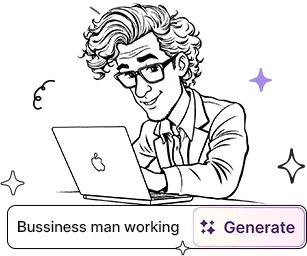
This is InstaDoodle’s headline feature. You type a short description, such as a business owner working at a laptop, and DoodleAI draws a doodle character or object. You then drop it into a scene.
Styles
The vendor lists three main AI styles: caricature, cartoon and realistic. The lifetime-offer page also mentions black-and-white and color output, and the color tier is the one that lets you generate color elements. The Pro InstaDoodle plan on the main site adds professional AI styles. If you care about a consistent look, pick one style early and keep to it, because mixing styles is the quickest way to make a video look messy.
Regenerating variations
Click an element and you can generate three new versions, then keep the one you like. Pro lists four variations per element. This is the feature that most reviewers lean on, because first attempts are not always usable. One reviewer in October 2026 said they simply regenerated a few scenes that did not work at first.
Image to sketch
You can upload a photo, logo or graphic and have it redrawn as a doodle. It is handy for putting yourself, a product or a brand mark into a scene. Check how your image looks after conversion, since fine detail usually simplifies.
What to watch
The AI is where InstaDoodle users report the most disappointment. Several Trustpilot reviewers describe errors, dated results or the need for many tries, and the lifetime InstaDoodle tiers list 150 AI credits. Our reviews guide has the details.
Building Scenes From the Library
You do not have to use AI for everything, and often you should not.
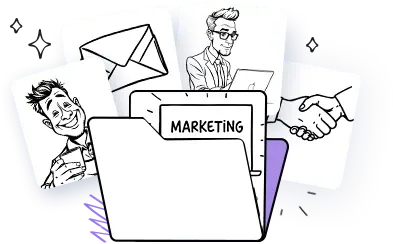
- More than 1,000 doodle elements cover people, objects and scenes. They are consistent in style and free from the oddities that AI generation sometimes produces.
- 14 or more project templates give you a ready-made structure so you do not start from a blank canvas.
- Custom backgrounds include blackboards, greenboards, blueprints and math paper, which suit lessons and technical topics.
- Drawing hands are the hands that appear to sketch each element. The lifetime listing mentions seven, and Pro adds eight more.
A good habit is library first, AI second. Build your InstaDoodle scene from the library, then use AI only for the two or three things that are missing. That keeps the look consistent and saves credits. Our how to use InstaDoodle guide describes the routine.
The catch
A medical content creator on Trustpilot found the library limited for anatomy and medical illustration and had to upload their own images. If your topic is specialised, check the library before buying.
Animation and Transitions
Animation is what makes a whiteboard video feel like a whiteboard video.
- Element animations: draw, wipe, slide, fade and pop-in, so each element can appear in a different way. The lifetime listing counts six animation types in total.
- Slide transitions: fade, wipe, push left or right, and iris.
- Timing and order: you arrange elements on a timeline and choose when each appears.
- Advanced adjustments: blur, transparency and a switch to disable white fills, useful when you want a doodle on a coloured or photo background.
The catch
At least one reviewer wished that several assets could be drawn at the same moment, because elements appear in sequence. For most explainer videos, sequence is the point. For fast, busy motion graphics, it can feel limiting.
Sound: Voiceover, Music and Sync
A whiteboard video lives or dies by its voiceover. InstaDoodle lets you record or upload your own voice and add background music. The lifetime listing also mentions automatic audio sync with slides, so your timing follows the narration.
AI voices
AI voices are an extra. The checkout we viewed offered a six-voice pack as an add-on at a special $27, listed at $47 normally, and the Agency plan on the main site includes AI voices in more than 30 languages. One four-star reviewer felt the voice package was not strong for the price. If you already have a voice tool, or you record your own voice, you may not need the add-on at all.
Languages
InstaDoodle says you can type prompts in any language. That is about what you can write, which is different from the voices available. If you need narration in a particular language, check that language is covered before paying for the add-on.
Output: Rendering, Resolution and Aspect Ratios
- Cloud rendering: your InstaDoodle video is built on the vendor’s servers, so you do not need a powerful computer. You press render and come back later.
- 1080p HD: the lifetime tiers list 1080p. The Pro InstaDoodle plan on the main site lists 2K and 4K.
- Aspect ratios: 16:9 for YouTube, 9:16 for stories and shorts, 4:5 and 1:1 for feeds. This is useful if you publish on several platforms.
The catch
Trustpilot’s summary mentions that rendering and saving can become slow on larger files with many slides, and one reviewer said longer videos had to be split into parts. If you plan 20-minute lessons, test a long project during the refund window before assuming it will work.
Everything Else
- Built-in image editor: freehand draw, fill, eraser and background removal. It saves you opening another app for small fixes.
- Cloud access from multiple devices: you can log in from different machines.
- Free software updates: the vendor lists these with every InstaDoodle tier, and the lifetime page mentions a support guarantee of two years from purchase.
- Support: a ticket system at help.instadoodle.com, praised by many reviewers.
Which Features Matter for Which Person
| If you are | Prioritise | Be careful with |
|---|---|---|
| --- | --- | --- |
| A teacher | Library, backgrounds, own voiceover | Specialist subject gaps |
| A small business owner | Templates, aspect ratios, image-to-sketch | InstaDoodle AI credits and add-ons |
| A course creator | Auto audio sync, long project handling | Render time on big files |
| A YouTuber | Aspect ratios, consistent style | Variation in AI quality |
| A freelancer | Commercial license, higher resolution | License terms on cheaper InstaDoodle tiers |
Features You May Not Need
Marketing pages often make every feature sound essential. Ask yourself honestly which ones you will use in the first month. If you mainly make short lesson clips, a huge font collection or 4K export may be irrelevant. If you never use AI voices, do not pay for them. The lifetime offer is attractive partly because it keeps things simple, and complexity is what makes the add-on sales add up. See our lifetime deal guide for the cost side.
Feature Limits to Keep in Mind
Put the catches together and a clear picture forms.
- AI-generated images vary in quality and consume credits.
- Specialist subjects may not be covered by the library.
- Elements are drawn one after another.
- Large projects can slow down, and long videos may need splitting.
- AI voices cost extra.
- Some features depend on the plan you choose.
None of these is a dealbreaker for a beginner making simple explainers. All of them are worth testing during your refund window if your needs are more demanding. If you want to see how InstaDoodle compares with other software, see InstaDoodle alternatives.
How Features Differ by Plan
The vendor’s InstaDoodle plan tables show that not every feature comes with every tier. Here is a summary of what the pages listed, which you should confirm at checkout.
| Feature | Standard and lifetime listing | Pro listing on the main site |
|---|---|---|
| --- | --- | --- |
| Drawing hands | 7 | 8 more added |
| AI styles | 3 | Professional styles added |
| Variations per element | 3 | 4 |
| Fonts | Standard set | 20 professional fonts and custom upload |
| Export | 1080p | 2K and 4K |
| Slides per project | Standard | Unlimited |
| Support | Free updates and support | VIP support |
| License | Not listed | Commercial license listed |
If you are a casual user, the standard set may be plenty. If you sell videos, produce a lot of content or need high-resolution output, the higher InstaDoodle tier matters. Do not pay for features you cannot name a use for.
What to Test in Your First Week
A refund window is only useful if you use it. These are the tests that tell you the most.
- A library-only scene. Build one scene using no AI at all, to see how the library feels.
- Five AI prompts. Generate five elements, count how many you would use unchanged, and note the credits used.
- A long project. Add 25 or more slides and check how the editor behaves.
- A render. Time it, and note the quality of the result.
- A voiceover sync. Upload narration and see how well the slides follow it.
- An aspect ratio change. Switch from 16:9 to 9:16 and check how the scene adapts.
- A support ticket. Ask a real question and see how quickly you get a useful answer.
These seven checks give you a far more reliable picture than any feature list. They also show whether the catches mentioned by InstaDoodle reviewers matter for your own use.
Marketing Emphasis Versus Daily Use
Sales pages put the AI front and centre, with phrases about unlimited creativity and studio-grade videos. In daily use, the features that tend to matter most are quieter ones: a dependable library, a clear editor, consistent animation options and decent rendering. Reviewers who stay happy with the software usually describe a library-first routine and a small number of AI generations per project. Reviewers who feel disappointed usually expected the AI to carry the whole process. Knowing which kind of user you are before you buy saves both money and frustration.
Key Takeaways
- InstaDoodle combines an AI image engine with a large doodle library.
- The best results usually come from library first and AI second in InstaDoodle.
- InstaDoodle animates with draw, wipe, slide, fade and pop-in effects.
- AI voices, credits and higher InstaDoodle plans are where InstaDoodle costs can grow.
- Test long projects and specialist topics in InstaDoodle before the refund window closes.
Want to Check the Current InstaDoodle Offer?
From $37
See the live price and terms on the vendor checkout. A 60-day money-back guarantee is advertised.
Check InstaDoodle PriceInstaDoodle Features
What is DoodleAI in InstaDoodle?
DoodleAI is InstaDoodle’s AI engine. You type a prompt and it generates a doodle character, object or background, which you can place in a scene and regenerate if you want a different version.
Does InstaDoodle have a library of doodles?
Yes. The vendor lists more than 1,000 doodle elements, 14 or more templates and a range of backgrounds, so you can build scenes without AI.
Can I make color videos in InstaDoodle?
The lifetime-offer page says color elements require the $67 InstaDoodle tier, while the standard $37 tier is black-and-white. Confirm this at checkout.
Does InstaDoodle include AI voices?
Not in the lifetime InstaDoodle tiers we saw. AI voices were offered as an add-on, and the Agency InstaDoodle plan on the main site includes them. You can upload your own voiceover instead.
What video sizes does InstaDoodle support?
The vendor lists 16:9, 9:16, 4:5 and 1:1, which cover YouTube, stories and feeds.
Does InstaDoodle work offline?
No. It is cloud-based and runs in a web browser, and rendering happens on the vendor’s servers.
How We Checked This Page and Sources
We read the feature lists on the vendor’s main site and offer page on October 31, 2026, and matched them with limits mentioned in public Trustpilot reviews. We have not tested every feature ourselves.
- InstaDoodle main website: pricing, features and FAQ
- InstaDoodle lifetime offer page
- InstaDoodle reviews on Trustpilot
- InstaDoodle help center
We are an independent review site and have not tested every feature ourselves. We cannot see your account or order, and prices and terms change, so confirm them on the vendor’s checkout. If you spot a mistake, please tell us through the contact page. You can read how we work on our about page.
Keep Reading
Ready to Look at InstaDoodle Yourself?
From $37
Check the live offer, then keep your receipt and the refund terms. See our refund guide first if you want the steps.
Check InstaDoodle Price