What a Whiteboard Animation Video Is
A whiteboard animation video, sometimes called a doodle video, shows drawings appearing on screen as if a hand were sketching them while a narrator explains. The format is popular for lessons, product explainers, training and social clips because it turns an abstract idea into a simple visual story, and because the pace is naturally gentle. The viewer watches the drawing form and follows the explanation at the same time.

Until recently, making one meant either learning animation software or hiring a specialist. AI doodle video makers such as InstaDoodle try to shorten that path. You describe a scene in words, InstaDoodle generates drawings, and you arrange them on a timeline with voice and music. This guide is about the craft that sits underneath any such tool, so that your InstaDoodle videos work whichever one you use. Where it helps, we show where InstaDoodle fits.
Independent guide: not written or reviewed by the seller of InstaDoodle. Facts checked on October 31, 2026.
Why the Format Works
You will see bold statistics on sales pages about conversion rates and viewer retention. We would not rely on any of them, because they are rarely sourced. The reasons the format tends to work are more modest, and more reliable.
- It slows information down. Drawing takes time, so each idea gets room to land before the next one arrives.
- It focuses attention. With few elements on screen, viewers see what matters.
- It lowers the barrier for abstract topics. A diagram of how something works is easier to follow than a paragraph.
- It feels approachable. A hand-drawn look is friendly, which suits teaching and onboarding.
- It is flexible. Drawings work with or without a face on camera.
None of that guarantees results. A badly scripted whiteboard video is as forgettable as any other. The format helps, and the script does the work.
Start With the Viewer, Not the Tool
Before you write anything, answer four questions in one sentence each.
- Who is this for? A new employee, a student, a customer who has never heard of your product?
- What do they already know? Pitch the InstaDoodle video at that level.
- What should they understand or do afterwards? One main takeaway.
- Where will they watch it? A lesson page, YouTube, a phone feed, an email?
The last question shapes everything else. A vertical clip for a phone feed needs a faster hook and bigger visuals than a three-minute lesson on a course page.
Write the Script in Pictures
A whiteboard script is a list of things to show, with words attached.
Use the problem, solution, action shape
Most good explainers follow this order: name a problem the viewer recognises, show the idea that solves it, prove it with one example and finish with a clear next step. The shape is simple, and it works for a sixty-second ad and a ten-minute lesson alike.
Aim for short sentences
Most people speak at roughly 130 to 160 words per minute. A 60-second video therefore holds around 150 to 200 words. Short sentences are easier to illustrate and easier to listen to. If a sentence needs two pictures, split it.
Give every sentence a visual
Read your script aloud and, for each sentence, imagine what would appear on screen. If you cannot picture anything, the sentence is abstract. Replace it with a concrete example. Instead of “improve productivity”, say “a person crossing three tasks off a list”.
Cut ruthlessly
Remove introductions, apologies and anything the viewer could skip. A video that ends sooner than expected feels generous.
Plan the Scenes
Turn the script into a storyboard with a simple table.
| Scene | Narration | What appears | Length |
|---|---|---|---|
| --- | --- | --- | --- |
| 1 | “Meetings run too long.” | A clock melting over a table | 5 sec |
| 2 | “Nobody knows the goal.” | Question marks above four people | 6 sec |
| 3 | “Start with one question.” | A hand writing a big question | 6 sec |
| 4 | “Who decides, and by when?” | Two labelled boxes | 7 sec |
| 5 | “Try it tomorrow.” | A calendar with a check mark | 5 sec |
Seven to ten scenes is plenty for a sixty-second video. If you find yourself planning twenty, you are probably trying to say too much.
Pick a Visual Language and Keep It
Consistency is what makes a whiteboard video feel professional.
- One drawing style. Do not mix cartoon and realistic characters in the same video.
- One hand. Keep the same drawing hand throughout.
- One or two effects. Use the draw effect for main subjects and a simple wipe or fade for labels.
- Limited text. Put a few words on screen, not sentences. The narrator carries the message.
- Clear contrast. Dark lines on a light background are easiest to read on phones.
With an AI tool such as InstaDoodle, consistency needs extra care. Generate elements in the same style, and use library items for anything the AI renders awkwardly. Our how to use InstaDoodle guide covers this library-first habit.
Voice and Sound
A strong voiceover carries a whiteboard video more than any picture does.
- Record in a quiet room, with soft surfaces nearby to reduce echo.
- Speak slightly slower than normal conversation, and pause between ideas.
- Use a conversational tone, as if explaining to a friend.
- Add gentle background music, set well below the voice.
- Include captions where possible, since many viewers watch with the sound off.
If you do not want to record your own voice, AI voices exist, and InstaDoodle sells them as an extra. Listen to samples first, because quality and language coverage vary.
Pacing: The Hidden Skill
Pacing is how fast the picture changes relative to the words. Too slow and viewers drift, too fast and they cannot follow.
- Each scene should usually last between five and ten seconds.
- The picture should appear just before or as the narrator names it.
- Let a key drawing finish before moving on.
- Vary the rhythm: a quick scene followed by a slower one.
- End with a short, still moment so the final message sinks in.
Watch your InstaDoodle video once with the sound off, and ask whether the visuals alone tell the story. Then watch it with your eyes closed and ask whether the audio alone makes sense. Both should mostly work.
Whiteboard Video Ideas by Audience
For teachers and trainers
- A three-step explanation of a concept from your subject.
- A “common mistakes” video with one mistake per scene.
- A short onboarding video for new staff.
- A recap video after a lesson.
For small businesses and marketers
- “What we do” in sixty seconds.
- A product explainer with a problem, a solution and a call to action.
- A customer question turned into a short answer video.
- A short ad variation for each audience.
For creators and coaches
- A faceless explainer channel on a niche topic.
- A short video summarising a long post or podcast episode.
- A lead magnet introduction.
- A vertical clip for each key idea in a course.
Where AI Doodle Tools Like InstaDoodle Fit
AI doodle video makers like InstaDoodle change the production, not the thinking. They are good at turning a scene description into a drawing quickly, and at letting you try several versions. They are weaker at guaranteeing consistent quality, which is why public reviews of InstaDoodle mention regenerating images, and why a library of ready-made elements is useful.
If you want to compare tools, read InstaDoodle alternatives. If you want to know what InstaDoodle includes, read the features guide. And for a view from real InstaDoodle users, read InstaDoodle reviews.
Ideas for US Teachers, Small Businesses and Creators
These hypothetical scenarios show how the same craft applies in different places.
- A teacher in Texas turns a science concept into a ninety-second explainer for a class page. Before uploading student names or images to any cloud tool, she checks district rules and student privacy laws such as FERPA.
- A bakery owner in Ohio makes a vertical how-to-order video for social media, and confirms the license allows business use.
- A real-estate agent in Florida explains the buying process in sixty seconds for new clients, and checks any rules that apply to advertising.
- A creator in California builds a faceless channel, and discloses any sponsorship in line with Federal Trade Commission guidance.
In each case the script and the viewer matter more than the tool, and the local rules affect what you can say and share.
Common Mistakes to Avoid
- Trying to say everything. One video, one idea.
- Too much on screen. Every extra element competes for attention.
- Reading a document aloud. Write for the ear, not the eye.
- No call to action. Tell viewers exactly what to do next.
- Ignoring the first five seconds. Open with the problem, not your name.
- No test viewers. Show the InstaDoodle video to two people before publishing and ask what was unclear.
How to Tell Whether a Video Worked
Pick one measure before you publish.
| Goal | Measure |
|---|---|
| --- | --- |
| Teach | Quiz results or fewer repeated questions |
| Sell | Clicks on the link in or under the InstaDoodle video |
| Inform | Watch time and drop-off point |
| Onboard | Fewer support tickets on the topic |
Compare the InstaDoodle video with your previous approach, and change one thing at a time. A single improvement to the hook often moves results more than a dozen cosmetic tweaks.
A Starter Plan for Your First Five Videos
- A 60-second “who we are or what this is” video.
- A 60-second answer to your most common question.
- A 90-second how-to for one task.
- A 60-second myth-versus-fact video.
- A 90-second recap or case example.
By the fifth, you will have a feel for scripts, pacing and your tool, and you can judge honestly whether a paid tool is saving you time. If you try InstaDoodle, use your refund window for this exercise, and read our refund guide first.
A Worked Example in InstaDoodle
To show how the craft above turns into practice, here is how you might make a short explainer in InstaDoodle for a small business.
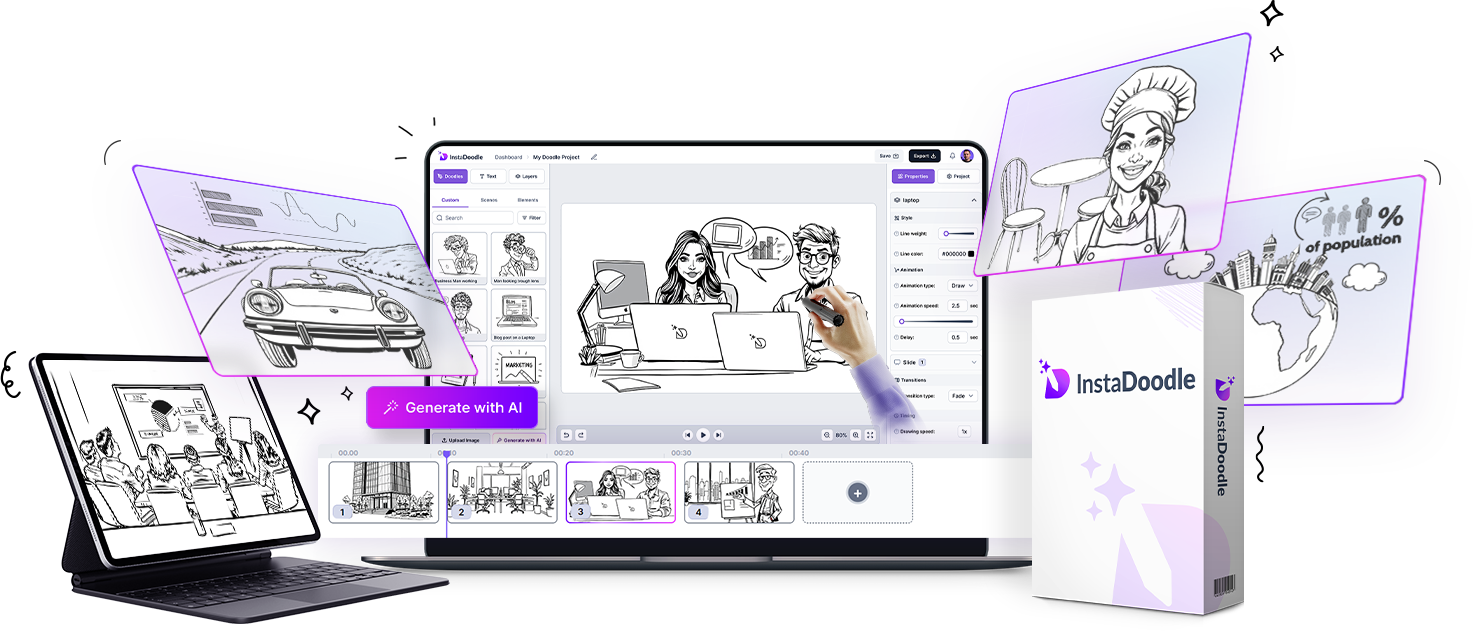
The idea. A local bakery wants a 45-second video explaining how to order a custom cake. The viewer is a busy parent who has never done it.
The script. Problem: ordering a custom cake feels complicated. Solution: it takes three steps. Proof: a quick example. Action: send us the date and the flavour.
The scenes in InstaDoodle.
1. Open InstaDoodle, choose a vertical 9:16 project for social media and pick one drawing hand.
2. Search the library for a cake, a calendar and a phone. Generate anything missing with DoodleAI, for example a baker holding a whisk.
3. Use the draw effect for the cake and the baker, and the wipe effect for labels such as date, flavour and size.
4. Record your voiceover in short takes, upload it and let InstaDoodle sync the slides.
5. Add soft music, render, then export a copy for each platform.
What InstaDoodle adds. It removes the drawing and the animation work, so your time goes into the script and the voice. What it does not do. It does not write the story for you, and it does not guarantee that every AI image will look right the first time, which is why library elements and regeneration matter.
What InstaDoodle Changes About the Process
Using InstaDoodle shifts effort rather than removing it. Drawing time drops sharply. Script time stays the same, which is as it should be. Review time may rise a little, because you will check AI images for mistakes. Many InstaDoodle users find the trade worthwhile, and others find the AI quality frustrating, as public reviews show.
If you are curious about the details, read our InstaDoodle features guide and our step-by-step InstaDoodle workflow. If you are comparing InstaDoodle with other tools, the alternatives guide explains how.
Limits to Plan Around When Using InstaDoodle
- InstaDoodle uses credits for AI generation, so InstaDoodle plan to rely on the library for most scenes.
- Elements in InstaDoodle appear one after another, so design scenes in sequence.
- Large InstaDoodle projects can be slow to render, so keep early videos short.
- Commercial use depends on your InstaDoodle plan, so confirm it before client work.
Planning around these limits makes InstaDoodle a pleasant tool instead of a frustrating one.
Key Takeaways
- A whiteboard video is a story told in simple pictures, and the script does most of the work.
- Write in short sentences, give every line a visual and cut ruthlessly.
- Keep one style, one hand and a few effects throughout.
- Tools like InstaDoodle speed up drawing, but craft decides results.
- Test with real viewers and one clear measure.
Want to Check the Current InstaDoodle Offer?
From $37
See the live price and terms on the vendor checkout. A 60-day money-back guarantee is advertised.
Check InstaDoodle PriceWhiteboard Animation Videos
What is a whiteboard animation video?
It is a video in which drawings appear on screen as if sketched by a hand while a narrator explains an idea. It is often used for lessons, training and explainers.
How long should a whiteboard video be?
Most explainers work well between 60 and 120 seconds. Lessons can run longer if the pacing stays tight.
Is InstaDoodle a good tool for whiteboard videos?
InstaDoodle is a cloud-based option that combines a doodle library with AI generation. Public reviews are mixed on AI quality, so test InstaDoodle within the refund window.
Do I need drawing skills?
No. Tools with a doodle library or AI generation let you build scenes without drawing, and good scripting matters more.
Can I make whiteboard videos with AI?
Yes. AI tools such as InstaDoodle generate doodle elements from text prompts, though quality varies and several regenerations may be needed.
How much does it cost to make one?
It ranges from free, using slides and narration, to a few hundred dollars for a freelancer, or a software price for a tool. Compare total cost over time.
How We Checked This Page and Sources
This guide combines general explainer-video practice with how InstaDoodle describes its workflow. We avoided unsourced statistics, and we mark where a tool such as InstaDoodle changes the process.
- InstaDoodle main website: pricing, features and FAQ
- InstaDoodle help center
- InstaDoodle reviews on Trustpilot
We are an independent review site and have not tested every feature ourselves. We cannot see your account or order, and prices and terms change, so confirm them on the vendor’s checkout. If you spot a mistake, please tell us through the contact page. You can read how we work on our about page.
Keep Reading
Ready to Look at InstaDoodle Yourself?
From $37
Check the live offer, then keep your receipt and the refund terms. See our refund guide first if you want the steps.
Check InstaDoodle Price