The Short Version
InstaDoodle does not offer a free trial. The vendor’s own FAQ says so, and points people to its money-back guarantee instead. That guarantee is described as 60 days on the vendor’s main pages, on its lifetime-offer page and next to the buy buttons. But one line in the footer of the offer page says 14 days, and other affiliate sites quote 30 days. We read the pages on October 31, 2026, and cannot tell you which wording is binding for your order.
So the practical advice is simple. Treat your checkout page and your receipt as the final word, take a screenshot on the day you buy, and make your decision well inside the shortest period you can find. This guide explains how to do that, how to ask for a refund and what to do if it does not go smoothly.
Independent guide: not written by the seller of InstaDoodle, so we cannot process refunds or see orders. Facts checked on October 31, 2026.
Is There an InstaDoodle Free Trial?
No. People often search for an InstaDoodle free trial, an InstaDoodle free version or an InstaDoodle free download. According to the vendor’s FAQ, there is no free version, and the way to try InstaDoodle is to buy it and rely on the InstaDoodle money-back guarantee.
That has two consequences. First, any page that offers a free copy of InstaDoodle is not offering the real product. It may be a pirated file, a survey trap or something worse. Since InstaDoodle runs in a web browser, there is nothing legitimate to download, so a “free download” is a warning sign in itself. Second, the guarantee takes on the role of a trial, which is why the details matter so much.
If you want to try the idea before paying, you can test it for free in other ways. Watch the sample videos on the vendor’s page, write a script and sketch it on paper, or try a free slide tool with narration. If those tests work, a paid tool becomes an easier decision. For comparisons, see InstaDoodle alternatives.
What the Guarantee Says, as Far as We Can Tell
Here is what the vendor’s pages said, with the places where they disagree.
| Source | What it says |
|---|---|
| --- | --- |
| Main site and FAQ | A 60-day money-back guarantee |
| Lifetime-offer page, main sections | A 60-day guarantee, with a promise to refund and let you keep the videos you made |
| Lifetime-offer page, footer | A 14-day no-questions-asked guarantee |
| Some affiliate sites | 30 days |
The “keep the InstaDoodle videos” promise is generous, but we have only seen it as marketing text, so ask support to confirm it in writing if it matters to you. The footer line, 14 days, is the most conservative figure. The wise approach is to act as if you have 14 days, and be pleasantly surprised if you have 60.
Before You Buy: Protect Your Refund
These small steps cost five minutes and can save you a dispute.
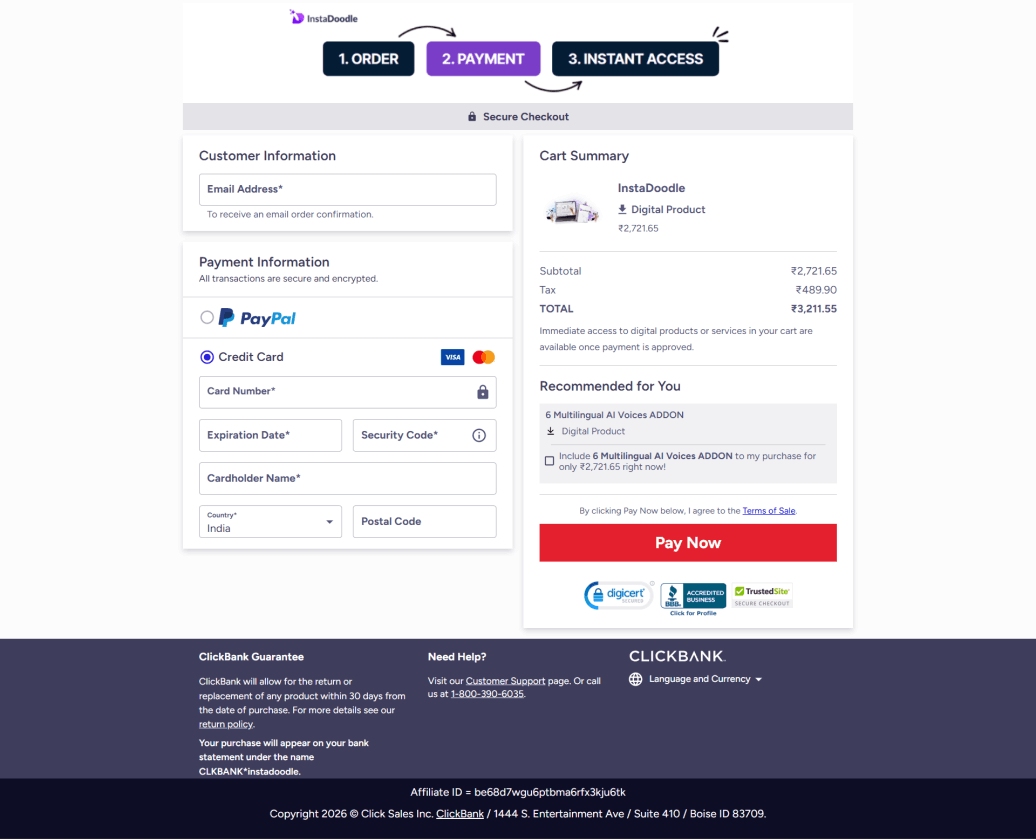
- Screenshot the guarantee wording on the InstaDoodle checkout page, and on the sales page you came from.
- Save your receipt and order email, and note the order number and the email address you used.
- Note the processor. If your checkout or receipt mentions a marketplace such as ClickBank, you may have a second route for refunds.
- Note the plan. Record whether it was one-time or monthly, the amount and any InstaDoodle add-ons.
- Set reminders for day 7, day 14 and day 45.
- Ask support two questions by ticket: which guarantee period applies to your order, and whether InstaDoodle add-ons are refundable.
How to Ask InstaDoodle for a Refund
The vendor’s help centre is at help.instadoodle.com, and support runs on a ticket system. Reviewers on Trustpilot repeatedly praise how quickly support replies, which is encouraging for this step.
- Open a ticket in the help centre, using the same email you purchased with.
- State clearly that you are requesting a refund under the InstaDoodle money-back guarantee.
- Include your order number, the date of purchase, the amount and the plan.
- Keep the message short and polite, and attach your screenshot of the guarantee if you have one.
- Save the ticket number and every reply.
- Follow up after a few business days if you hear nothing.
Here is a short message you can adapt.
Hello, I purchased InstaDoodle on [date] with order number [number] using this email address. I would like to request a refund under your money-back guarantee, as InstaDoodle does not meet my needs. Please confirm the refund and the expected timing. Thank you.
You do not need to write a long explanation. A short, clear request with the key details is what support teams handle fastest.
If Your Order Went Through a Marketplace
Purchases made through links like this can be routed through a marketplace such as ClickBank, and its processor name may appear on your card statement. If that is the case for you, a second route may exist.
Based on ClickBank’s own help pages, InstaDoodle buyers can look up an order on its order-support site and request a refund during the refund period. If the refund period has passed, the option no longer appears and you must contact the seller. Its guidance also warns that if a customer starts a chargeback and then asks for a refund through the marketplace, the refund will fail. In other words, a card dispute can close off the easier route. Try the vendor and marketplace routes first.
Check your receipt to see which payment processor you used. This is general information and your rights depend on where you live, and it is not legal advice.
A Sensible Timeline
| Day | What to do |
|---|---|
| --- | --- |
| 0 | Buy, screenshot the terms, save the receipt, set reminders |
| 1 to 3 | Build one real project from script to export |
| 4 to 7 | Test AI quality, rendering speed and a longer project |
| 7 | Decide, and open a refund ticket if it is a no |
| 14 | Absolute deadline if you want to respect the shortest wording |
| 45 | Check in only if you chose to keep it |
| 55 | Final warning before the 60-day period ends |
The principle is to decide early. The longer you wait, the more likely you are to run into a deadline you did not expect.
What Might Complicate a Refund
Be aware of these in advance.
- Conflicting periods. If your order says 14 days and you ask on day 30, you may be told no.
- Add-ons. Voice packs and other add-ons may have different terms from the main purchase. Ask.
- Subscriptions. If you bought a monthly InstaDoodle plan, cancel it to avoid further charges, and ask whether previous months are refundable.
- Heavy use. The vendor says you can keep your InstaDoodle videos after a refund. Confirm whether credits or InstaDoodle add-ons you used affect this.
- Third-party seller terms. If the processor is a marketplace, its rules about refund periods apply as well.
If something is unclear, ask in writing before you buy, not after.
What to Do if You Do Not Get a Reply
- Wait a few business days and follow up on the same ticket.
- Send a second message with your order number and screenshot.
- If your order was processed by a marketplace, use its order-support site.
- Contact your bank or card issuer only as a last resort, and only after the other routes have been tried.
- Keep every message in a folder, with dates.
Most refund requests are routine, and the vendor appears to reply quickly according to public reviews, but it helps to be prepared.
Should You Buy at All?
A money-back guarantee lowers the risk, and it does not remove it. If you are curious about InstaDoodle, a sensible InstaDoodle plan is to confirm the price, save your proof, use the software on a real project in the first week and decide with the facts. Our lifetime deal guide covers the cost side, our legitimacy check covers the trust side and the reviews guide covers what other people experienced.
Refund or Chargeback: Know the Difference
These two words are often confused, and the difference affects how you get your money back.
A refund is a request to the seller, or to the marketplace that processed your order, to return your payment under the guarantee. It is the normal route, and it is usually the fastest and cleanest.
A chargeback is a dispute raised with your bank or card issuer, which asks them to take the money back from the seller. It can be useful when a seller will not respond at all, but it can also cause problems. According to ClickBank’s published guidance, if a customer starts a chargeback and then requests a refund through ClickBank, the refund will fail. Banks also have their own time limits and evidence requirements.
The sensible order is simple: ask for a refund first, give the seller a fair chance to respond, and consider a dispute only if the refund route fails. This is general information and not legal advice.
A Record-Keeping Template
Copy this into a note on the day you buy.
| Item | Your entry |
|---|---|
| --- | --- |
| Date of purchase | |
| Order number | |
| Email used | |
| Amount and InstaDoodle plan | |
| One-time or monthly | |
| Add-ons bought | |
| Guarantee period shown | |
| Payment processor | |
| Screenshot saved | Yes or no |
| Refund deadline, shortest wording | |
| Support ticket numbers |
Filling in the table takes two minutes, and it turns a stressful dispute into a simple request if you ever need one.
If You Bought a Monthly Plan
Some pages show monthly InstaDoodle plans, so you should know how to stop one. Log in to your account, find the billing or plan settings, and cancel before the next renewal date. Save the cancellation confirmation. Then ask support whether past months are covered by the guarantee, and which period applies. If you cannot find a cancel option, open a ticket and ask for the cancellation to be confirmed in writing. Check your statement afterwards, to be sure the charge has stopped.
Details People Often Miss
A few small points trip people up again and again.
- Time zones: a deadline that ends “on day 14” may end at midnight in the vendor’s time zone, not yours.
- Email address: refunds are matched to the purchase email, so use that one when you write.
- Spam folders: replies from support sometimes land in junk mail, so check it.
- Screenshots: pages change, and a saved image of the original wording is proof of what you saw.
- Partial refunds: if you bought several items, say clearly which ones you want refunded.
Refunds for US Buyers
If you are in the United States, you have a few more routes than the vendor’s ticket system, and it helps to know them in the right order.
- The vendor and the marketplace come first. Ask InstaDoodle support, and use the marketplace’s order-support site if your receipt shows one.
- Your card issuer is the next step. US card issuers have dispute processes with time limits, which are often around 60 days from the date of the statement showing the charge. Check your issuer’s rules, and remember that a dispute can complicate a marketplace refund.
- Report real problems. If you believe you were misled, you can report it at ReportFraud.ftc.gov and to your state attorney general’s consumer office, and you can file a complaint with the Better Business Bureau.
This is general information and not legal advice. Keep your receipt, screenshots and messages, because every one of these routes asks for them.
What Reviewers Report About Refunds
Public reviews are mixed on this point, and it is better to know before you buy. Trustpilot’s own summaries note that some InstaDoodle reviewers were unhappy with the refund process, describing difficulty or silence when asking for their money back. Reviews on the other side describe quick fixes, including one reviewer who had trouble with an add-on and said support put it right.
In its public replies, the company has said in some cases that a refund was processed and that its message may not have reached the customer. We cannot judge individual cases, but the pattern gives you a practical lesson: ask early, use the email address you bought with, check spam folders, and keep your ticket number.
Key Takeaways
- InstaDoodle has no free trial, according to its own FAQ.
- The guarantee is 60 days on most pages and 14 days in one footer line.
- Screenshot the wording and save your receipt on the day you buy InstaDoodle.
- Ask InstaDoodle support in writing about InstaDoodle add-ons and the exact period.
- Decide within the first week so you stay inside even the shortest period.
Want to Check the Current InstaDoodle Offer?
From $37
See the live price and terms on the vendor checkout. A 60-day money-back guarantee is advertised.
Check InstaDoodle PriceInstaDoodle Refund and Free Trial
Does InstaDoodle have a free trial?
No. The vendor’s FAQ says there is no free version. The money-back guarantee works as the trial.
How long is the InstaDoodle money-back guarantee?
Most vendor pages say 60 days. One footer line on the InstaDoodle offer page says 14 days. Confirm on your own checkout and receipt.
How do I request an InstaDoodle refund?
Open a ticket at help.instadoodle.com with your order number and email, and say you want a refund under the guarantee. If a marketplace processed your order, you may also use its order-support site.
Do I keep my videos after a refund?
The vendor’s offer page says you can keep the videos you created. Ask support to confirm this in writing if it matters to you.
Can I get a refund on InstaDoodle add-ons?
We do not know. Ask support before buying InstaDoodle add-ons such as AI voices, and save the answer.
Is it safe to download a free InstaDoodle?
No. InstaDoodle is a web-based tool, so a free download is not the real product and may be unsafe.
How We Checked This Page and Sources
We read the guarantee wording on the main site, the InstaDoodle offer page and its footer, and the vendor’s FAQ on October 31, 2026, and we compared it with how marketplace processors describe refunds.
- InstaDoodle main website: pricing, features and FAQ
- InstaDoodle lifetime offer page
- InstaDoodle help center
- InstaDoodle reviews on Trustpilot
We are an independent review site and have not tested every feature ourselves. We cannot see your account or order, and prices and terms change, so confirm them on the vendor’s checkout. If you spot a mistake, please tell us through the contact page. You can read how we work on our about page.
Keep Reading
Ready to Look at InstaDoodle Yourself?
From $37
Check the live offer, then keep your receipt and the refund terms. See our refund guide first if you want the steps.
Check InstaDoodle Price